Car Modification Apps in 2026: How to Choose the Right One
What to look for in a car modification app: realistic edits on your own photo, wraps, wheels, body kits, styles, motorcycles, pricing and honest limits.
By Ayoub Farid · · 3 min read
There are now dozens of apps promising to "mod your car with AI". They range from genuinely useful planning tools to filters that slap a cartoon spoiler on any photo. Here's how to tell them apart and pick one that helps you make real decisions.
The three kinds of car modification apps
1. Template configurators
You pick your make and model from a list and customize a pre-built 3D or 2D model. They're accurate for wheel styles from specific brands, but limited to cars in their library and never look like your car in your driveway.
2. Filter-style editors
Overlay stickers, stance sliders and color shifts. Fun for memes, but rarely realistic enough to judge a real purchase.
3. AI photo editors
They edit a photo of your actual car with image AI: paint, wraps, wheels, body kits and complete styles, while keeping the angle, lighting and background. This is the category that has improved most since 2025, and the one most useful for planning a build.
What to look for
- Works on your own photo. Any car, any angle, including modified or rare ones.
- Keeps your car recognizable. Body lines, glass and background shouldn't melt.
- Covers the mods you care about. Paint and wraps (with finishes), wheels, stance, body kits, spoilers, tint, lighting.
- Whole-build styles. One-tap looks like JDM, VIP, widebody or rally help you explore directions quickly.
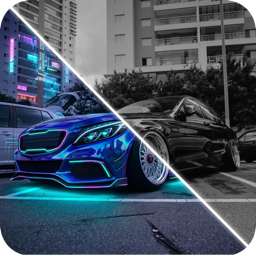
- Before/after comparison. A slider is the fastest way to judge a change.
- Free-text ideas. Describe a custom build in plain words.
- Motorcycle support if you ride.
- Transparent pricing. Know what's free and what's a subscription before you start.
- Honest limits. Good apps tell you renders aren't fitment guarantees.
Questions to ask before you subscribe
- Can I see examples on cars similar to mine?
- How are my photos handled? Read the privacy policy.
- Can I cancel easily? On iPhone, subscriptions are managed in your Apple ID settings.
- Does it do anything besides design? Some apps, CarForge included, also identify cars from a photo.
How to get the most out of any mod app
- Use a good photo; see photo tips for AI car design.
- Change one thing at a time.
- Generate several variations and compare.
- Take your favorites to the shop; see how to describe mods to a shop.
Where CarForge fits
CarForge is an AI photo editor and car identifier for iPhone and iPad. It includes 16+ whole-vehicle styles, 20+ paints and wraps, accessories (wheels, body kits, spoilers, tint, underglow, exhaust, roof racks, lowered stance, fender delete), background cleanup and a custom-idea box, plus a before/after slider and a for-fun Hype Score. It's free to download, with scans and designs in a Premium subscription. See the full workflow in our AI car design guide.
Frequently asked questions
What is the best app to modify my car virtually?
For realistic previews of your own car, an AI photo editor works best. Look for one that handles paint, wheels, body kits and full styles with a before/after comparison.
Are car modification apps free?
Most are free to download, with in-app purchases or subscriptions for full features or unlimited generations.
Can a mod app tell me if wheels will fit?
No visual app can guarantee fitment. Confirm sizes and offsets with a wheel shop; see our wheel offset guide.
Do car modification apps work on motorcycles?
Some do. CarForge includes café racer, bobber, street fighter and adventure bike styles.
Try it on your own car
Identify any car. Redesign yours in seconds.
Snap a photo to get the make, model and specs, or try paint, wraps, wheels, body kits and 16+ AI styles on your own car. On iPhone and iPad.
Download CarForge