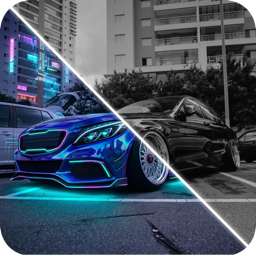
Why You Should Preview Car Mods Before You Buy Them
Most regretted car mods come from buying blind. Here's why previewing wraps, wheels and body kits on your own car first saves money, time and resale value.
By Ayoub Farid · · 2 min read
Ask any group of enthusiasts about their regrets and you'll hear the same stories: the wheels that looked huge online and tiny on the car, the matte wrap that looked flat in real life, the wing that was "too much" by week two. Almost all of these come from one thing: buying a mod without seeing it on your own car first.
The real cost of a mod you don't like
- Wheels and tires: reselling used wheels typically loses a good share of what you paid, plus fees and hassle.
- Wraps: removal costs money, and a second wrap means paying for labor twice.
- Body kits: often drilled or bonded; going back may mean bodywork and paint.
- Paint: effectively permanent, and a respray in a non-original color can affect value.
A few minutes of previewing is the cheapest insurance in car modding.
What previewing catches
- Proportions. Wheel diameter, spoke design and ride height change the car's stance in ways a spec sheet can't show.
- Color on your shape. Satin and metallic films read differently over curves. See car wrap colors.
- Combinations. Bronze wheels plus a copper wrap might cancel each other out. You'll only notice when you see them together.
- Style drift. A rally roof rack on a VIP build? Previewing shows when parts belong to different ideas. See car styles explained.
How to preview properly
- Use a good photo of your car; see photo tips for AI.
- Preview the whole planned build, not just the next part.
- Sleep on it. If you still love it a few days later, it's a good sign.
- Show someone honest. A friend's first reaction is valuable.
- Then check reality: fitment, legality and cost. See are car mods legal?
Tools for previewing
- AI photo editors like CarForge restyle a photo of your actual car.
- Brand configurators show specific wheels or films on stock models.
- Physical samples of wrap films, essential for the final color pick.
Use them together: AI to choose a direction, configurators for specific products, samples for the final call.
Preview your next mod
CarForge lets you try paint and wraps, wheels, body kits, spoilers, tint, underglow and complete styles on a photo of your own car, with a before/after slider. Start with the wheel visualizer or car wrap visualizer guides.
Frequently asked questions
What car mods do people regret most?
Commonly: oversized or poorly fitting wheels, extreme lowering on daily drivers, loud exhausts, cheap body kits and bold colors chosen without seeing them on the car.
Can I see mods on my car before buying?
Yes. AI car design apps render mods on a photo of your own car, and many wheel and wrap brands offer configurators.
Are previews accurate enough to buy from?
They're accurate for the look, not for fitment or exact color. Confirm both with your installer.
Does previewing mods cost money?
Some tools are free; AI apps like CarForge are free to download with a subscription for unlimited designs.
Try it on your own car
Identify any car. Redesign yours in seconds.
Snap a photo to get the make, model and specs, or try paint, wraps, wheels, body kits and 16+ AI styles on your own car. On iPhone and iPad.
Download CarForge