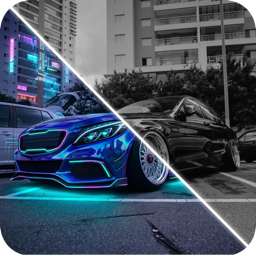
Car Background Remover: Clean Studio Shots From Any Car Photo
Remove cluttered backgrounds from car photos and place your car in a clean studio scene. When to use it, tips for natural results, and honest-listing rules.
By Ayoub Farid · · 2 min read
A great car in a messy car park is a wasted photo. Whether you're selling, posting a build update or making a wallpaper, a clean background makes the car the hero. AI background removal can now do this in seconds, keeping shadows and reflections believable.
What a car background remover does
There are two approaches:
- Cut-out: separates the car from the background and leaves it on a transparent or plain color. Good for catalogs and graphics.
- Scene replacement: keeps the car and generates a new environment such as a concrete studio, an empty warehouse or a clean street, with matching shadows and floor reflections. This looks more natural for social posts and listings.
When to use it
- Selling a car: clean images look more professional. Keep at least one unedited photo, and never hide damage.
- Build updates: show the car without distracting cars, people or bins.
- Wallpapers and prints.
- Before/after comparisons: a neutral background makes design changes easier to judge.
Tips for natural results
- Start with good light. The AI keeps the car's lighting; a car shot in harsh sun won't look right in a soft studio. See car photography tips.
- Keep the whole car in frame, including wheels and shadow.
- Avoid overlapping objects. A pole in front of a door is hard to remove cleanly.
- Check the wheels and glass. Background can show through windows; make sure the new scene is visible there too.
Honest listings
If you sell a car with an edited background, that's generally fine. Editing the car itself (hiding scratches, changing wheels) is misleading. Many marketplaces have rules about edited photos, so check them. A good rule: the background can change, the car can't.
Try it in CarForge
CarForge's Remove & Clean tool clears background clutter and places your car or motorcycle in a clean studio scene. Combine it with paint or wheel previews for clean build renders, or use it for Instagram-ready edits.
Frequently asked questions
How do I remove the background from a car photo?
Use an AI tool that detects the car and replaces or removes everything around it. Apps like CarForge can place the car in a clean studio scene in one step.
Can I use edited background photos to sell my car?
Usually yes, as long as the car itself isn't altered. Include unedited photos too and check the marketplace's rules.
Why do the car's windows look wrong after removal?
Old background can remain visible through the glass. Use a tool that regenerates the scene, or pick a photo with less visible through the windows.
What's the best background for car photos?
Plain concrete, a neutral wall or an open, empty space, since they keep attention on the car.
Try it on your own car
Identify any car. Redesign yours in seconds.
Snap a photo to get the make, model and specs, or try paint, wraps, wheels, body kits and 16+ AI styles on your own car. On iPhone and iPad.
Download CarForge